Five Days of Microsoft AI Models - Day 4
The Models Come to Your Tools
Where you can use Microsoft's MAI models: Foundry, GitHub Copilot, gateways like Vercel and OpenRouter, and hybrid intelligence on Windows.
So far this week I've talked about the models themselves. But a model only matters if you can reach it from where you already work. Most developers don't want a new place to go. They have an editor, a framework, a cloud account, a way of building. So today's question is simple: where can you actually use these models?
The answer is: in more places than a few months ago, and the list grew again this month.
Home base: Microsoft Foundry
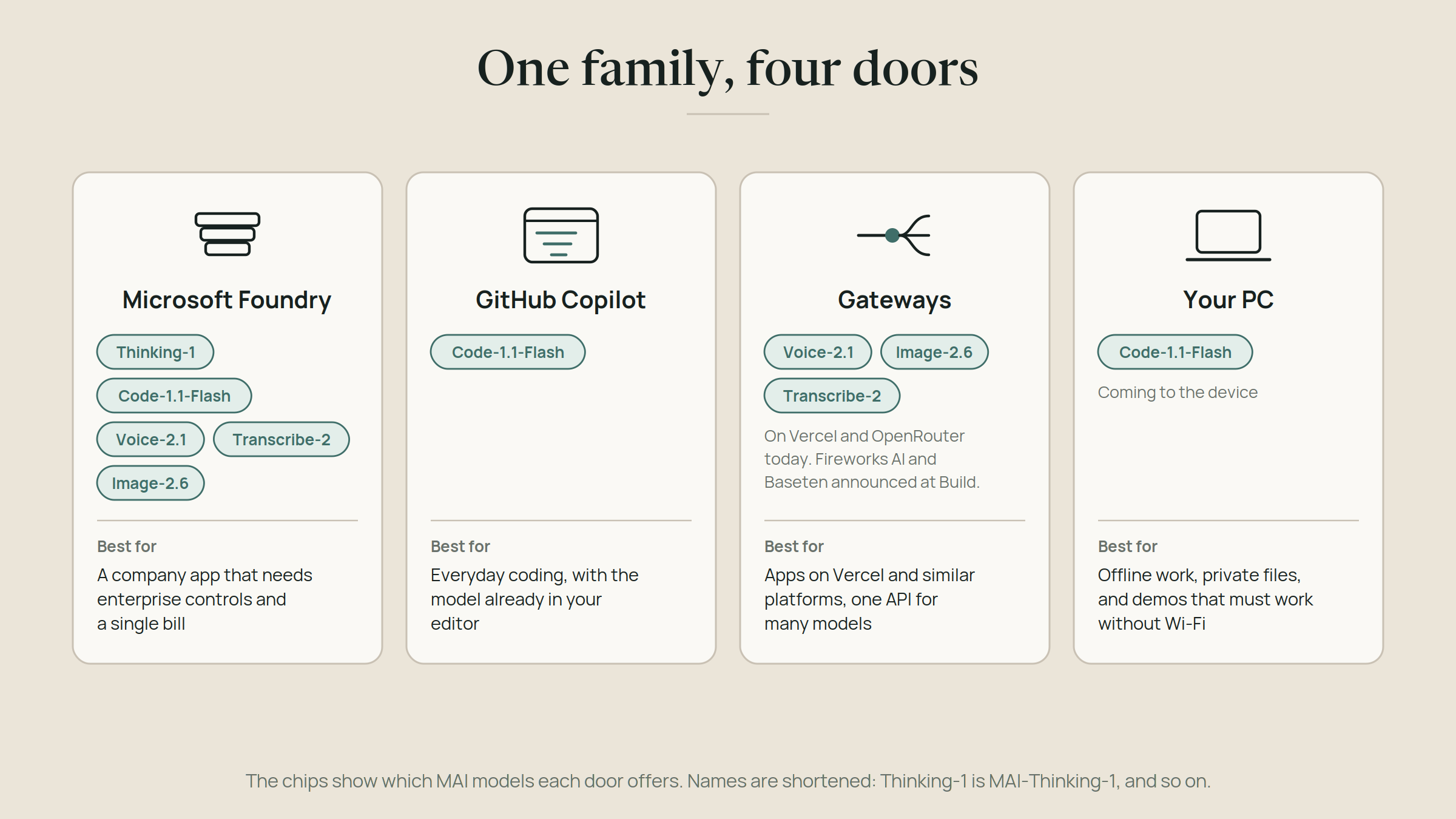
Foundry is Microsoft's platform for building AI apps and agents, and it's where the MAI models arrive first. MAI-Thinking-1 is in public preview there, and the voice, transcription and image models are there too. Foundry also hosts models from other labs, so you can compare them side by side in one place.
If your company already runs on Azure, this is the straight path. Your identity, your security rules and your billing are already in place, and nothing new has to be approved.
In your editor: GitHub Copilot
You met this one on Day 2. MAI-Code-1.1-Flash sits in the model picker of GitHub Copilot, in VS Code, Visual Studio, the Copilot CLI and GitHub Mobile. For a developer, it's the easiest door of all: you don't go anywhere, the model shows up in the tool you already have open.
Through the gateways you already use
Many developers never call a model directly. They go through a gateway: a service that sits between your app and many different models, so you use one API for all of them, with routing, usage tracking and failover when one provider has a bad day.
Microsoft has put its models in those places too. OpenRouter now carries MAI-Voice-2.1, MAI-Image-2.6 and MAI-Transcribe-2, and at Build in June Microsoft also announced Fireworks AI and Baseten. In October, Vercel added MAI-Voice-2.1, MAI-Voice-2.1-Flash and MAI-Transcribe-2 Streaming to its AI Gateway, billed at the listed rates with no markup from Vercel. If you build on Vercel, you can now give your app a voice or live transcription without leaving your stack.
Here's why that matters for everyone. You don't have to change how you build to use the models. You pick the door that fits your stack, whether that's your cloud platform, your editor or a gateway you already use, and the models are the same ones either way.
Gateways matter for a second reason, and it connects to Day 2. I said the model you build on today will probably be replaced within months. With a gateway, trying a new model is changing a name in your code, not rebuilding your app. It's the swap-friendly setup I keep asking for.
One request, three doors
Here's what that looks like in code. MAI-Voice-2.1-Flash is available through all three: Microsoft Foundry, OpenRouter and Vercel's AI Gateway. This script sends the same sentence, with the same voice, through each door. Notice that the voice name is identical everywhere. Only the address and the shape of the request change.
// One sentence, one voice, three doors.
// Needs Node.js 20 or later. For the Vercel door: npm install ai
import { writeFile } from "node:fs/promises";
import { experimental_generateSpeech as generateSpeech } from "ai";

const TEXT = "Room B is upstairs, second door on the left.";
const VOICE = "en-US-Harper:MAI-Voice-2.1-Flash"; // the same voice name at every door

// Door 1: Microsoft Foundry, through the Azure Speech API.
// The text goes in SSML, the XML format Azure Speech uses for speech.
async function viaFoundry() {
  const ssml = `<speak version="1.0" xml:lang="en-US"><voice name="${VOICE}">${TEXT}</voice></speak>`;
  const res = await fetch(
    `https://${process.env.SPEECH_REGION}.tts.speech.microsoft.com/cognitiveservices/v1`,
    {
      method: "POST",
      headers: {
        "Ocp-Apim-Subscription-Key": process.env.SPEECH_KEY,
        "Content-Type": "application/ssml+xml",
        "X-Microsoft-OutputFormat": "audio-24khz-48kbitrate-mono-mp3",
      },
      body: ssml,
    }
  );
  if (!res.ok) throw new Error(`Foundry: ${res.status} ${await res.text()}`);
  return new Uint8Array(await res.arrayBuffer());
}

// Door 2: OpenRouter, an OpenAI-compatible speech endpoint.
async function viaOpenRouter() {
  const res = await fetch("https://openrouter.ai/api/v1/audio/speech", {
    method: "POST",
    headers: {
      Authorization: `Bearer ${process.env.OPENROUTER_API_KEY}`,
      "Content-Type": "application/json",
    },
    body: JSON.stringify({
      model: "microsoft/mai-voice-2.1-flash",
      input: TEXT,
      voice: VOICE,
      response_format: "mp3",
    }),
  });
  if (!res.ok) throw new Error(`OpenRouter: ${res.status} ${await res.text()}`);
  return new Uint8Array(await res.arrayBuffer());
}

// Door 3: Vercel AI Gateway, through the AI SDK.
// The AI SDK reads your gateway key from AI_GATEWAY_API_KEY.
async function viaVercel() {
  const result = await generateSpeech({
    model: "microsoft/mai-voice-2.1-flash",
    text: TEXT,
    voice: VOICE,
    outputFormat: "mp3",
  });
  return result.audio.uint8Array;
}

const doors = { foundry: viaFoundry, openrouter: viaOpenRouter, vercel: viaVercel };
for (const [door, speak] of Object.entries(doors)) {
  await writeFile(`room-b-${door}.mp3`, await speak());
  console.log(`Saved room-b-${door}.mp3`);
}
To run it, you need four environment variables: SPEECH_KEY and SPEECH_REGION from an Azure Speech resource in a region that offers MAI-Voice, OPENROUTER_API_KEY, and AI_GATEWAY_API_KEY. Each door saves its own mp3 file, and all three should sound the same.
On your PC: hybrid intelligence
On October 7, Microsoft added the last door at a Windows and Surface event in San Francisco. It calls the idea hybrid intelligence: every AI task runs where it belongs, on your device when that's faster, more private or works offline, and in the cloud when it needs more power than a laptop has.
Three things make it real.
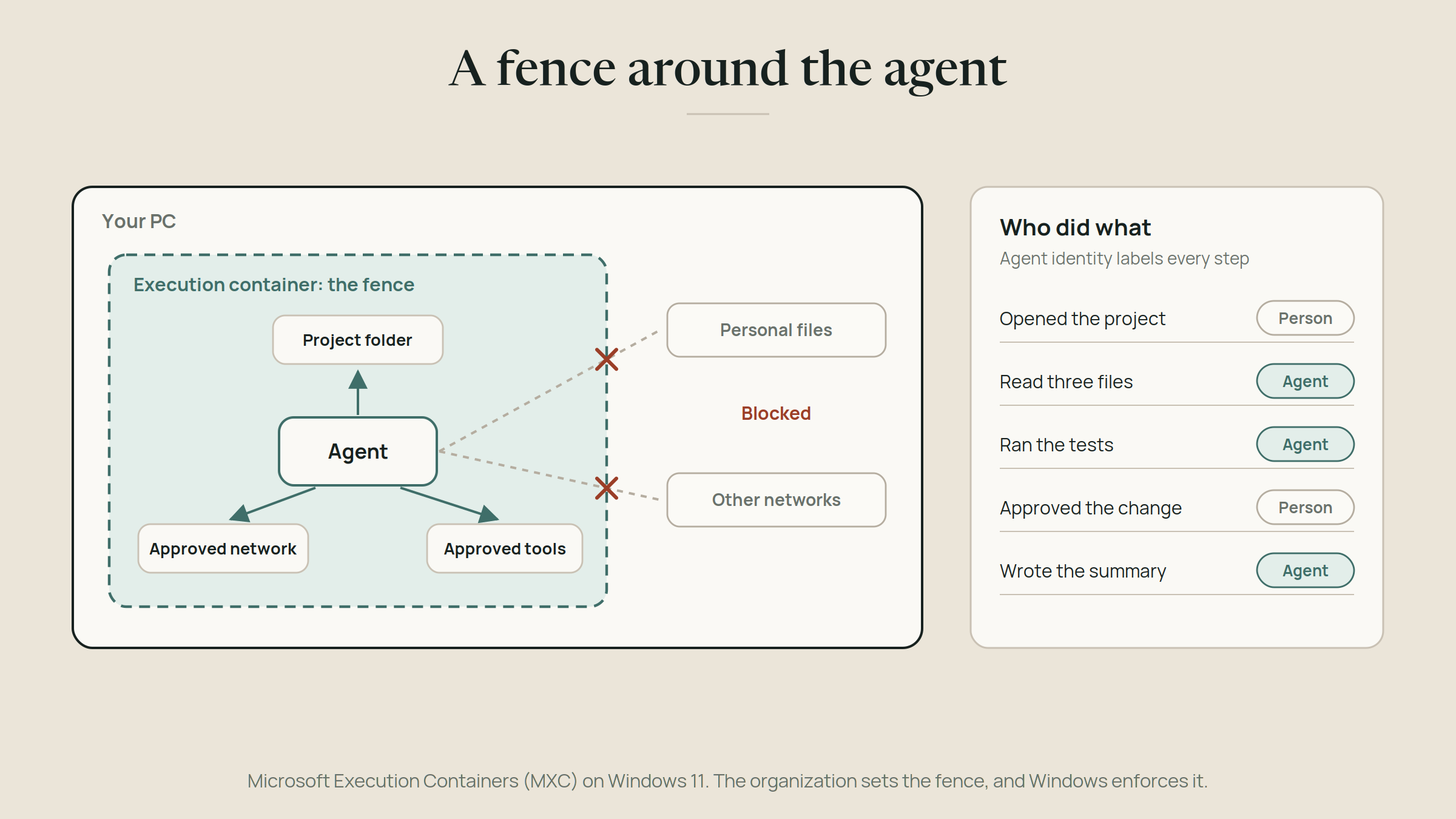
A safe place for agents to run. Microsoft Execution Containers, MXC for short, are generally available on Windows 11. An organization defines which files and networks an agent may touch, and Windows enforces it while the agent works. Agent identity shows which step was taken by an agent and which by a person. Agents like GitHub Copilot, OpenAI's Codex and LM Studio already support it. It's the least flashy announcement of the day and the one I think matters most, because you can't run agents on everyone's PC without a way to keep them in their lane.
A frontier coding model on the device. MAI-Code-1.1-Flash is coming to the PC itself. Microsoft compressed it to 3-bit precision, which makes it nearly 80% smaller while keeping its coding quality, so a mixture-of-experts model with 137 billion total parameters and 6.8 billion active can run on local hardware with a 256K token context window. The mixture-of-experts design from Day 2 is what makes this possible. Windows ML, the runtime that runs models on Windows, also gains llama.cpp support, so the open-weight models you download yourself get a first-class path on Windows too.
Routing that decides where each task goes. GitHub's HydraFusion, which already sends cloud tasks to the best model, is being extended to Windows so it can hand suitable work to the model on your device and stretch your token budget. Microsoft announced it as an experimental preview for late October, in the GitHub Copilot app, the Copilot CLI and VS Code. Copilot on Copilot+ PCs will also be able to use local files and recent activity as context, with your permission, and prefer local models for that work so sensitive information stays on the device.
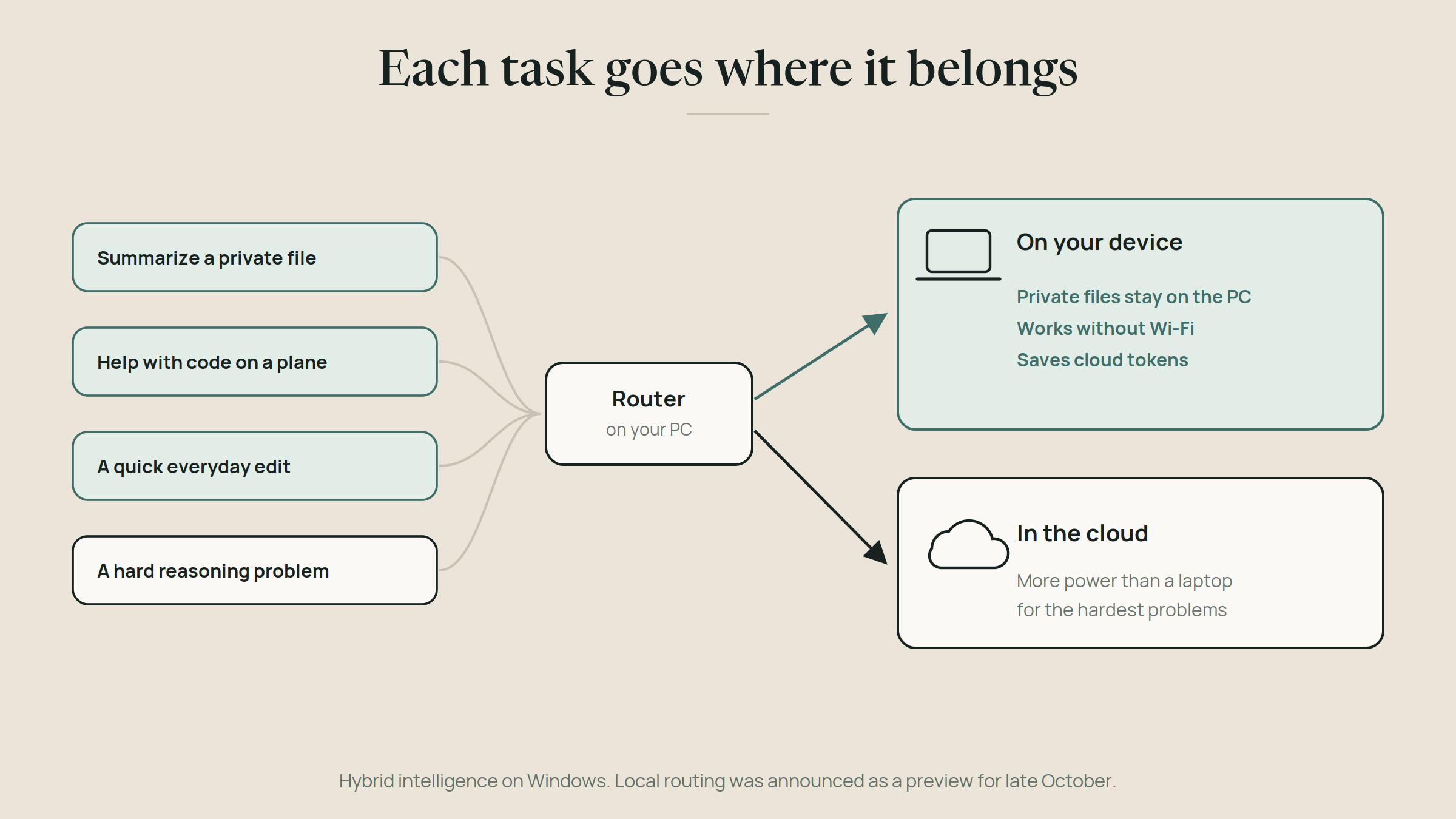
On the day itself, what became available was MXC and hardware pre-orders. Local routing was announced as a late-October preview, and the Copilot features arrive over the coming months. October 7 set a direction more than it changed anyone's desktop.
What this changes
The models no longer ask you to move. You can reach them from your cloud platform, your editor, your gateway or your laptop, and the choice of where a task runs becomes a per-task decision instead of a one-time architecture bet.
It also changes what a model is. When the same model sits behind four doors, it stops being a product you commit to and becomes a part you can swap. That's good for you, and it's why the question I'd ask isn't "which model?" but "which door, for which job?"
Which door for which job
Foundry: a company app that needs enterprise controls and a single bill.
GitHub Copilot: everyday coding, with the model already in your editor.
A gateway: apps built on Vercel or similar platforms, or when you want one API for many models and quick swaps.
Your PC: offline work, private files, planes, and any demo that has to work when the Wi-Fi doesn't.
Try it yourself
Use the door you already have. If you build on Vercel, call MAI-Voice-2.1-Flash through AI Gateway and give an app a voice. If you live in VS Code, pick MAI-Code-1.1-Flash in the Copilot model picker for a day. If you have a Copilot+ PC, watch for the local routing preview later this month.
Tomorrow, the last day: putting the whole family together, cloud, gateway and local.
Download speak-three-doors.mjs for the three-door voice example.
Pass it on
Share this article
Read next